 A product by VrbTech.asia

Sales by salesperson
See what each salesperson brought in for the period you choose: AMC contracts plus converted quotations, with quotations given, converted and not yet converted.
AMC management software · UAE
AMCore helps UAE maintenance companies manage AMC contracts, renewals, planned visits, quotations, invoices and payments, and see what each salesperson brings in — while keeping business records on the company’s own office PC.

Actual AMCore interface · fictional demonstration data
New in AMCore 1.6.5
The highlights of the 1.6 updates, all included in 1.6.5. It installs over any 1.6.x version and keeps your data.
See what each salesperson brought in for the period you choose: AMC contracts plus converted quotations, with quotations given, converted and not yet converted.
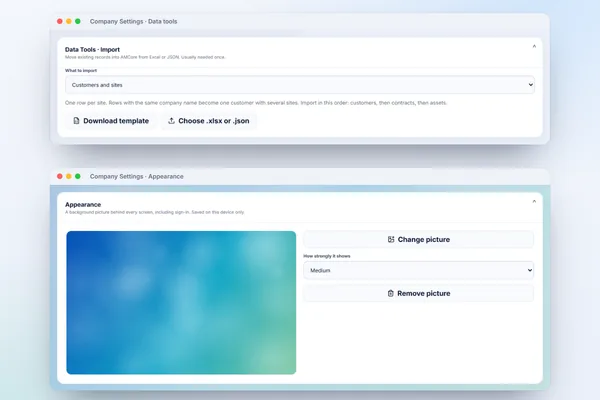
Owners can bring existing customers, sites, assets, AMC contracts and Products & Rates in from Excel. Templates are included, and rows are checked before saving.

Choose a picture for the background of every screen, including sign-in, and how strongly it shows. It stays on your PC.
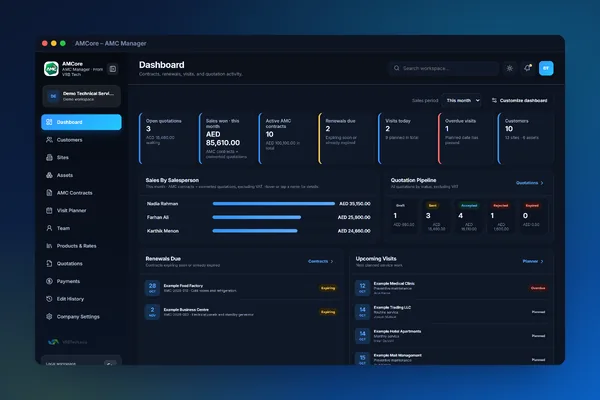
Switch between light and dark from the top bar. Each device remembers its own choice, on the office PC and on phones.
Full details are in the 1.6.5 release notes. Screens show fictional demo data.
Everyday control
Bring the work behind each maintenance agreement into a clear routine — from the first quote to the next renewal.
See contracts, renewals due, overdue visits and what each salesperson has brought in on one dashboard — with renewals that start a new, editable agreement period.
Contracts & renewals →Plan by customer, contract and site, assign the right person, then record completion remarks, photos and documents as evidence.
Visit planning →Create AED quotations, AMC contracts and invoices with VAT, TRN, bank details and your logo — exported as clean, branded PDFs.
Documents & PDFs →Everything in one workspace
Twelve connected areas cover the full life of a maintenance agreement — customers, sites and equipment, contracts, visits, people, pricing, paperwork, payments and safe collaboration.
One office. Several devices.
Owners, coordinators, salespeople and technicians can sign in from permitted devices on the same trusted private office network. Each user sees only the pages and records allowed for their role.
Not cloud sync or internet access. The master PC must remain on, and the local service must not be exposed to the internet or to public or guest networks.
Inside AMCore
Real AMCore screens on desktop and phone. Tap any screenshot to enlarge it. All names and records shown are fictional demonstration data.
Scroll or swipe for all 17 screens →
Who it’s for
AMCore is industry-neutral. If you manage recurring service agreements and send people to customer sites, it fits the way you already work.
From promise to proof
Add the customer, sites, scope, dates, value and planned visit frequency.
Assign visits, share editable contact messages and keep the team focused on permitted records.
Capture completion evidence, generate documents and prepare the next valid contract period.
Trial & plans
Start with the Monthly plan, or ask our sales team about yearly plans and offers. Users, devices and the number of companies depend on the plan.
7-day free trial
Add your logo, TRN, VAT and document defaults, bring your customers and contracts in from Excel, and run real quotations and visits with a few colleagues on the office network. Starting the trial needs internet once.
Download AMCore 1.6.5Plans
Tell us how many users, devices and companies you need and we’ll send current pricing, yearly plans and licence terms.
Ask for pricingRelease centre
A clear route to the latest installer, with previous releases kept for authorised support and rollback needs.
The latest Windows release of AMCore – AMC Manager — for new installations and for upgrading existing ones.
Before upgrading: back up the company database and attachments. Windows may show an “unknown publisher” prompt because the installer is not commercially code-signed — you can verify the file with its SHA-256 checksum.
FAQ
AMCore is an offline-first Windows application from VRB Tech for UAE maintenance and service businesses. It keeps customers, AMC contracts, service sites, planned visits, employees, products and rates, quotations, invoices, renewals, documents and edit history in one local workspace.
It is industry-neutral and suits fire and safety, gas, HVAC, facilities management, equipment servicing, repair and technical-services companies — any business that visits customer sites or manages recurring service agreements.
No. AMCore runs on your company's own Windows master PC and stores business data in a local database there. This edition has no internet data synchronisation. It works without a constant connection: starting the free trial needs internet once, and the licence is checked online at least once every 7 days. That check sends record counts only, never customer or business data.
Yes — on the same trusted private office network. Team members open the master PC's local link in a browser and sign in with their own account and PIN, and can add it to their home screen. It is not a native Android or iOS app, the master PC must stay switched on, and the local service should never be exposed to the internet or to public or guest Wi-Fi.
Yes. You can set your company TRN, currency, default VAT rate, bank details and logo, and they appear on quotations, AMC contracts and invoices. AMCore is practical operations software, not a certified accounting or tax-compliance package.
Yes. The owner chooses which pages each user can open. Technicians can be limited to the Visit Planner and their assigned visits, and salespeople only see their own linked customers, contracts, quotations, invoices and related visits — enforced by the master service, not just hidden in the interface.
Yes. The owner can import customers with their sites, assets, existing AMC contracts and Products & Rates from Excel (.xlsx) or JSON, using the templates in Company Settings → Data tools. Rows are checked and previewed before saving, and duplicates or rows with errors are listed and skipped.
Yes. The dashboard shows sales by salesperson for the period you choose: AMC contracts plus converted quotations, with quotations given, converted and not yet converted. Users without price access see counts instead of amounts.
No. AMCore prepares an editable WhatsApp or email message for the customer or the assigned employee, including the site address or map link when available. You review it and choose whether to send.
You can back up manually or on reminders you configure, restore from inside the app and migrate to a replacement PC. We recommend keeping regular backups on another drive.
Yes, AMCore includes a 7-day free trial. Starting it needs an internet connection once; after that AMCore works offline as before. The number of users, devices and companies depends on the plan you choose — contact us for current plans.
Support & demos
Questions about setup, licences, data migration from Excel or a walkthrough for your team? Email us and we’ll get back to you.

